When I received a nextgen dart board (Gran Board, VDarts H2, etc…) one of the things I knew I wanted to do was to have the dart board app displayed on a bigger screen such as a TV or computer monitor.
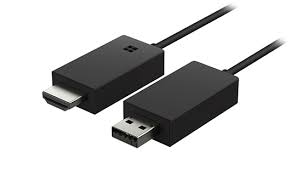
Purchase Microsoft Wireless Display Adapter

My first attempt was using an MHL adapter, which worked fine, but only worked on my tablet. I also didn’t like the cable mess it created being a 3 pronged cable (tablet, tv, power).
One solution was Chromecast, and I believe some people use it successfully with one app but not the other. From what I understood, the application running needs to be written in a way to enable use of chrome cast.
Then a friend recommended something called the Microsoft Display Adapter, saying it was simple to use, plug and play. I was a bit skeptical since Microsoft has a way of making some things difficult to use. But because I respect and trust my friends opinion, I took the plunge and purchased one of these bad boys….and I don’t regret it at all. I actually wouldn’t mind having a second one.
Super simple to use and works with Android! Both my phone and tablet work flawlessly with it. You plug it into your TV, then on your tablet click on “Smart View”, some gadgets might say MiraCast, or Screen Mirror. Works great for all your next gen dart board apps. Check the video!
IOS users — this obviously isn’t for you. Apple has their own solution.
Purchase a Gran Board 2 Bluetooth Electronic Dartboard

Purchase VDarts H2–Global Online Dartboard

Here’s the MS official video:
Here’s another video of a user using it with android:



Leave a Reply