
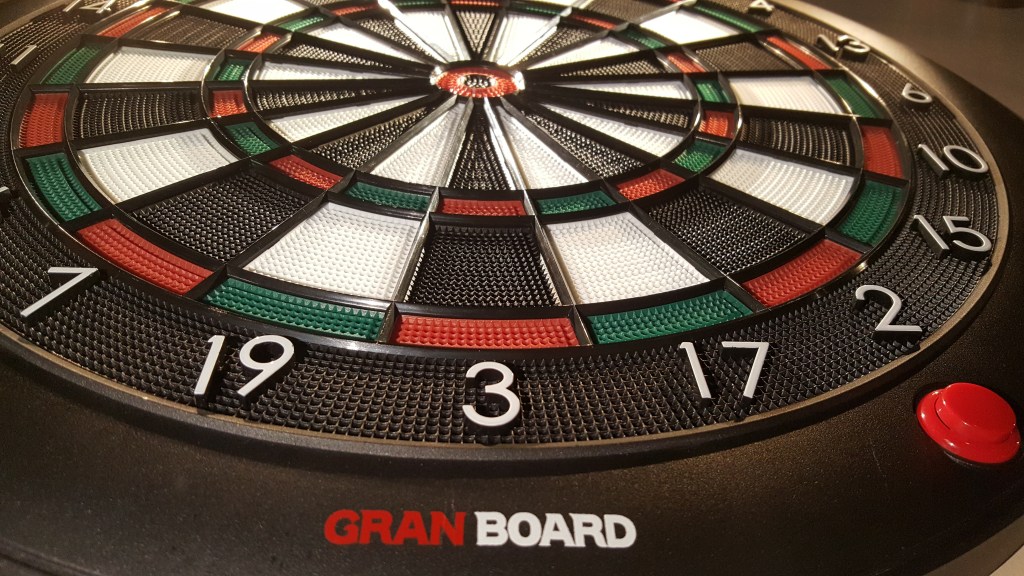
I’m not sure if it’s spelled Granboard or Gran Board, but this board (specifically the Gran Board 2) is home soft tip board that runs on 2 AA batteries. It uses Bluetooth technology to pair with your smart phone and/or tablet. Your tablet/smart phone hosts the app which includes a variety of games and online play.
Purchase a Gran Board 2 Bluetooth Electronic Dartboard

The App
All next generation dart boards have a similar model, using Bluetooth on the dart board to communicate with some device such as an iPad, android tablet, or smart phone. Given the same basic model and technology, what can set apart one board from the other is the quality or failures of the app.
I couldn’t find device spec requirements, but I would assume as long as you have a fairly modern Android or iOS device with Bluetooth support, the app should work.


Upon opening the app, you’ll hit a splash screen. Notice the color of the splash screen image above is red. The color of your splash screen indicates your rank/flight. The color displayed on the right side of the rank table indicates the color of your splash screen based on your rating.
Then there’s also a little menu on the bottom right of the splash screen. That’s where you can get into the settings, version number, add other guests who also have gran board accounts, and other info. The little bubble with 6, indicates news and announcements. This is where you can learn about new features, server maintenance schedule, new products, etc… It’s always good when an application has an ability to communicate news and maintenance with the user.


Then comes the three top level menu items:
- Game Select
- Gran Online Beta
- My Page
We’ll go into the Game Select and My Page in this post, and save Online Play for the part 3 review of the Grand Board 2.
Game Select


If you took a look at the images, there’s a good amount of games available for play as well as options for the games. There’s a 4 player max on most games, and there’s also the ability to do 2 vs 2.
- 01 Games – you get your choice from 301 all the way up to 1501. With all the options you can dream of. Double in/out, master in/out, round settings, double bull, single bull,etc. It has the 01 games covered pretty well.
- Cricket – besides standard cricket, you get cut throat, hidden cricket, and hidden cut throat. Hidden cricket is interesting since you don’t know the numbers that are in play.
- Medley – in the medley menu you get to choose from a 3 leg, 5 leg, or 7 leg medley. You can even customize what games you want for the medley and the options.
- Animal Battle – this is a nice feature when nobody is around and you need some competition. They have different animals representing different levels of play from 1 (mouse) to 9 (lion). You can challenge one of these animals to either standard cricket, or 701.
- Practice – there’s a variety of practice games available. Some I’ve never seen in other boards. Count up, Cricket Count Up, Half It, Oniren, Shoot Force, Target Bull, Target T20, Target Hat, Target Horse, Target Choice. The target games are really about picking what you’re targeting and how many times you need to hit your target. I’ve used the Target Bull and Target T20 a lot to help improve my bull and triple (or treble?) 20’s.
- Party – as of now there are 3 party games, Beyond Top, Two Line, and Hide And Seek. I’ve only played Two Line and really enjoy that game, it’s almost like tic tac toe but you need to get 2 lines of 5 values, and you’re able to take your opponents number if you can hit it enough times.


Other great things, is you get the option to reverse rounds if needed. You get award movies for things like low ton, hat trick, ton 80, etc…
My Page
Think of My Page as your personal profile. It shows your stats in 01 and cricket, and it separates those stats by Practice and Vs stats. You get numbers and pretty charts to help see how you’re progressing. It also shows you your high scores in certain practice games.
There’s a page for your awards stats. You can do things like break down how many hat tricks you had this month, this week, or even today.
You get a weekly ranks page which shows a game rankings for things like cricket, 01, count up, and more. It also ranks awards like Ton80’s. All of this broken down to see where you stand globally, in your country, or just your group of friends.
You’ll also be able to customize the app a little via the My Page menu. Grand Board 2 allows you to customize the wallpaper for games, selecting different wall papers for different games. You can also use your own custom image which is pretty cool. You get to change the default award movies as well as the sounds of your marks and bulls. So it let’s you customize the app and feel of the game to however you want it.


Overall Thoughts
I just don’t think you can go wrong with the gran board 2 (or even gran board dash) especially with a pretty kick ass app. The app gives you a great select of games, a robot to play against, ability to customize the look and feel, and an in-app way to view stats and rankings. They really thought through this part, and they’ve done everything fairly well.
I did have some issues with the app early on, but the latest releases have pretty much been solid. When I did have issues I would be able to get support via Facebook. They also tend to release new games and features. One of those recent features was pretty big — Online Play!
I’ll be reviewing online play in part 3, the final installment of the gran board 2 review.

 KrakenDarts.com
Leave a comment